How to Download and Use XChat App: Complete Guide to Musk's End-to-End Encrypted Chat Application (2026 Latest Version)
Key Takeaways
- Official Release: XChat officially launched on Apple App Store in April 2026, available for immediate download
- Platform Limitations: Currently only supports iOS 26.0 and above for iPhone and iPad, does not support Android systems yet - beware of scams from unofficial channels
- Core Features: End-to-end encrypted messaging, audio/video calls, disappearing messages, screenshot blocking, large file sharing, massive group chats
- Zero-Cost Experience: Completely free to download and use, no ads, no tracking, no hidden fees
- Account Requirements: Requires existing X platform account to log in; new users must register an X account first
- Privacy Protection: Uses device-side key encryption; even X Corp. cannot read user conversations
1. XChat Quick Download and Installation Guide
1.1 System Requirements Check
Before downloading XChat, please confirm your device meets the following conditions:
Device Compatibility:
- iPhone: Requires iOS 26.0 or later
- iPad: Requires iPadOS 26.0 or later
- Storage Space: At least 179.2 MB available space required
Important Reminder: iOS 26.0 is the latest system version released in 2026. If your device cannot upgrade to this version, you will temporarily be unable to use XChat. Check your system version in "Settings > General > Software Update."
⚠️ Android User Warning: XChat currently does not support Android systems. Any website or channel claiming to provide "XChat Android APK download" is a scam. Do not download or install applications from unknown sources to avoid personal information leakage or property loss.
1.2 Downloading XChat from App Store
Step 1: Access Official Download Page
Open the App Store app on your iPhone or iPad and access XChat through one of the following methods:
Method A: Direct Search
- Enter "XChat" in the App Store search bar
- Find the app with developer "X Corp."
- Confirm the app icon and description match official information
Method B: Use Official Link (Recommended)
- Visit the XChat official download page in Safari browser
- Click the "Get" button, and the system will automatically jump to App Store
Step 2: Verify Application Authenticity
Before downloading, confirm the following information to avoid downloading fake apps:
- Developer Name: Must display as "X Corp."
- App Size: Approximately 179.2 MB
- Rating: Check user reviews (currently rated 3.6 stars with 690 ratings)
- Category: Social Networking
Step 3: Complete Download and Installation
- Click the "Get" button
- Verify using Face ID, Touch ID, or Apple ID password
- Wait for download and automatic installation to complete
- Find the XChat icon on your home screen
According to the detailed instructions in the XChat download tutorial, the entire download process usually takes 3-5 minutes, depending on your network speed.
1.3 Account Preparation
XChat uses X platform's unified account system, which means:
If You Already Have an X Account:
- You can directly log in using your existing account
- No need to re-register or fill in additional information
- Your X platform username, avatar, and other information will automatically sync
If You Don't Have an X Account:
- You need to first visit X platform (x.com) to register a new account
- Registration requires providing email address or phone number
- Complete basic information setup and verification process
- After registration is complete, you can log into XChat
This design keeps Elon Musk's X ecosystem unified, allowing users to seamlessly switch between public social networking (X platform) and private conversations (XChat).
2. XChat First-Time Setup Tutorial
2.1 Login and Account Authorization
Step 1: Launch Application
Tap the XChat icon on your home screen. Upon first launch, you'll see a welcome screen showcasing the app's core features:
- "Chat with anyone on X in a private space"
- "No ads. No tracking"
- "Fully end-to-end encrypted"
Step 2: Log In with X Account
The app will prompt you to log in with your X account. Based on user feedback, the login process is as follows:
- Tap the "Sign in with X account" button
- The system will redirect to the X platform authorization page
- Enter your X account username/email and password
- Authorize XChat to access your basic information
Important Note: Some users reported encountering Google account verification requirements during login. If your X account is linked to a Google email, the system may require Google verification. If you encounter this issue, ensure you can access the relevant email for verification.
Step 3: Set Up PIN Code
This is the most critical security setup step in XChat. Based on user feedback and App Store description:
- After successful login, the system will ask you to create a PIN code
- This PIN code protects your end-to-end encryption key
- Important: The PIN code never leaves your device and is never uploaded to X servers
- Choose a 6-digit combination that's easy to remember but difficult for others to guess
- Confirm the PIN code and click "OK"
Some users reported app freezing after setting the PIN code. If this happens, try:
- Force quit the app and reopen it
- Check if your network connection is stable
- Ensure your system version is iOS 26.0 or higher
2.2 Import Contacts
Step 1: Contact Sync Options
After completing PIN code setup, XChat will ask whether to sync your contacts:
- Sync X Platform Friends: Automatically import users you follow on X platform
- Sync Device Contacts: Scan your phone's address book to discover which contacts are also using XChat
- Manual Addition: Manually search and add contacts later
Step 2: Privacy Settings Adjustment
On the contact sync screen, you can set:
- Who can discover you (everyone/contacts only/no one)
- Whether to allow others to search for you by phone number or email
- Whether to appear in "people you may know" recommendations
Step 3: Complete Initial Setup
- Click "Continue" after making your selections
- XChat will display a brief feature introduction guide
- You can choose "Quick Tour" or "Skip" to directly enter the main interface
According to the official announcement, XChat emphasizes "chat with everyone on X - no invites, phone number exchanges, or asking 'are you on this app?'" because your social network already exists.
2.3 Interface Layout and Basic Navigation
XChat adopts a clean three-column layout:
Main Interface Components:
- Conversation List (left/main screen): Displays all chat conversations, sorted by recent activity
- Chat Window (middle): Message content of current conversation
- Contact Information (right/optional): View contact profile and chat settings
Bottom Navigation Bar:
- Chats: View all private and group chats
- Contacts: Browse address book and online status
- Settings: Privacy settings, notification preferences, account management
Top Toolbar:
- New Conversation: Quickly start a new chat
- Search: Find contacts or message history
- More Options: App settings and help center
3. XChat Core Features Usage Guide
3.1 Sending End-to-End Encrypted Messages
Starting a New Conversation:
- Tap the "New Message" icon in the top right of the main interface (usually a plus sign or edit icon)
- Enter the contact's X username or name in the search box
- Select the person you want to contact from search results
- Enter the conversation interface and start typing messages
Message Input and Sending:
- Text Messages: Type content in the bottom input box and tap the send button
- Emojis: Tap the smiley face icon to select emojis
- Voice Input: Long press the microphone icon for voice-to-text (requires system support)
- Paste Content: Directly paste text, links, or images
Message Encryption Indicator:
Each message displays a small lock icon or encryption symbol, indicating the message is end-to-end encrypted. According to the App Store description, "Every message is end-to-end encrypted with a key pair unique to you, protected by a PIN that never leaves your device. No one can read your conversations. Not even X."
Message Editing and Deletion:
- Edit Message: Long press a sent message, select "Edit," modify and resend
- Delete for Everyone: Long press message, select "Delete," choose "Delete for Everyone" or "Delete for Me Only"
- Edited messages display an "Edited" marker
- Deleted messages show "This message was deleted"
3.2 Sharing Photos, Videos, and Files
Sending Media Files:
- Tap the attachment icon to the left of the input box (paperclip or plus sign)
- Select the type of content to share:
- Photos/Videos: Select from album or take instant photos
- Files: Select documents from iCloud Drive or other locations
- Location: Share real-time location or place information
Large File Sharing Advantage:
XChat supports "large photo, video, and file sharing" with higher file size limits compared to other chat apps. Specific limits include:
- Photos: Original quality, no compression limits
- Videos: Support for long video transmission
- Files: Support various document formats, compressed files, etc.
Media Viewing and Management:
- Tap images or videos in messages to view fullscreen
- Long press media files to save to album or forward
- View complete history of "Media, Links, and Documents" on conversation details page
For cryptocurrency traders and users active on platforms like MEXC, you can securely share transaction record screenshots, wallet address QR codes, or investment analysis documents without worrying about privacy breaches.
3.3 Audio and Video Calls
Initiating Voice Calls:
- Open conversation with contact
- Tap the phone icon at the top
- Wait for the other party to answer
- Call interface provides options like mute, speaker, add participants
Initiating Video Calls:
- Tap the video camera icon in conversation interface
- Confirm camera permission (first use)
- Wait for the other party to answer and enable video
- During call, you can switch front/rear cameras or turn off video to switch to voice
Call Encryption Protection:
All audio and video calls are end-to-end encrypted, ensuring:
- Call content cannot be monitored by third parties
- Call quality does not noticeably degrade due to encryption
- Supports multi-person audio/video conferences (group call feature)
Network Quality Optimization:
- XChat automatically adjusts call quality based on network conditions
- In weak network environments, video reduces resolution to maintain connection
- View network latency and connection quality indicators during calls
3.4 Creating and Managing Group Chats
Creating New Groups:
- Tap "New Message" and select "New Group"
- Enter group name (required)
- Select group members (at least 2 people)
- Set group avatar (optional)
- Tap "Create" to complete
Group Settings Options:
- Group Information: Modify group name, description, and avatar
- Member Management: Add new members, remove members, set administrators
- Message Permissions: Set who can send messages (everyone/admins only)
- Privacy Settings: Whether group can be searched, whether approval required to join
Large Group Support:
XChat emphasizes support for "massive group chats," suitable for:
- Cryptocurrency project community discussions
- Enterprise team collaboration
- Hobbyist communities
- Family or friend groups
Compared to Telegram or WhatsApp groups, all XChat group messages use end-to-end encryption, providing a higher level of privacy protection.
3.5 Advanced Privacy Features
Disappearing Messages:
- Open conversation, tap more options at top (three dots)
- Select "Disappearing Messages"
- Set automatic message deletion time (10 seconds, 1 minute, 1 hour, 1 day, etc.)
- After enabling, all new messages automatically delete after set time
Screenshot Blocking:
- XChat has built-in "Block Screenshots" feature
- When enabled, the other party cannot screenshot your messages
- If the other party attempts to screenshot, you'll receive notification
- This feature can be enabled individually for each contact in conversation settings
Message Recall and Destroy:
- "Delete for Everyone" function can be used at any time
- After deletion, message also disappears from the other party's message history
- Can be recalled even if the other party has read the message
- Suitable for emergency handling of incorrect or sensitive information
Stealth Mode:
- Can hide "Last Seen" and "Online Status"
- Can turn off "Read Receipts" (blue checkmarks)
- Can set who can see your profile photo
- Configure in Settings > Privacy & Security
4. XChat Security Best Practices
4.1 Protecting Your PIN Code
The PIN code is the core of XChat's security architecture:
- Never share your PIN code with anyone, including people claiming to be X customer service
- Don't use simple number combinations like 123456 or birthdays
- Change PIN code regularly, recommended every 3-6 months
- Enable device lock screen, use Face ID or Touch ID for an additional layer of protection
Forgetting your PIN code may result in:
- Inability to decrypt message history
- Need to reset account and lose chat records
- Therefore, be sure to memorize or securely store your PIN code
4.2 Verifying Contact Identity
Before discussing sensitive information, confirm the other party's identity:
Verify Through X Platform:
- Check if the other party's X account has blue verification badge
- Review the other party's X account history and published content
- Confirm username spelling is accurate (beware of impersonators)
Use Security Code Verification:
- XChat may provide "Security Code" or "Fingerprint Verification" feature
- Compare security codes with the other party (usually a string of numbers or QR code)
- If security codes match, connection is secure and reliable
Confirm Through Other Channels:
- For important conversations, confirm identity via phone or video call
- Don't rely solely on text chat for identity verification
4.3 Beware of Scams and Phishing
Encrypted chat apps are often exploited by scammers:
Common Scam Types:
- Impersonating Official Customer Service: Claiming account anomaly, requesting PIN code or password
- Investment Inducement: Promising high returns on cryptocurrency investment projects
- Phishing Links: Sending malicious links to steal account information or install trojans
- Romance Scams: Building false relationships then borrowing money or requesting investment
Prevention Measures:
- XChat officials will never proactively contact you requesting PIN code or password
- Be highly alert to "guaranteed profit" investment opportunities
- Don't click suspicious links from strangers
- For monetary transactions, use legitimate platforms like MEXC exchange
4.4 Device and Account Security
Keep App and System Updated:
- Regularly check for XChat updates in App Store
- Updates usually include security patches and vulnerability fixes
- Also keep iOS system at the latest version
Enable Two-Factor Authentication:
- Enable two-factor authentication (2FA) for your X account
- Use authenticator apps rather than SMS verification
- Regularly check account login device list
Regularly Review Privacy Settings:
- Check app permission settings once a month
- Confirm what data is being collected
- Adjust privacy options to meet your needs
5. Frequently Asked Questions
1. Is XChat completely free?
Yes, XChat is marked as a free app on the App Store with no in-app purchases or subscription fees. According to the official promise, the app has "no ads, no tracking" and will not charge users or display advertisements.
2. Why does XChat need access to my contacts?
XChat needs access to contacts to help you discover which friends are also using the app. This permission is optional - you can deny authorization and manually search to add contacts. According to App Store privacy disclosures, contact data is linked to your identity but used for app functionality rather than ad targeting.
3. Will I lose chat history if I get a new phone?
XChat's end-to-end encryption architecture means messages are primarily stored locally on devices. When getting a new device, you may need to:
- Use cloud encrypted backup (if XChat provides this feature)
- Migrate chat records through key transfer mechanism
- Or accept the reality that message history cannot be recovered
It's recommended to regularly back up important conversation content and not rely entirely on the app's cloud sync functionality.
4. What languages does XChat support?
XChat supports 46 languages including Chinese (Simplified and Traditional), covering major global markets. Language settings automatically match your system language and can also be manually switched in app settings.
5. Why does login require Google account verification?
Some users reported encountering Google verification requirements during login. This typically occurs when your X account is linked to a Google email. If your X account doesn't have an associated Google account but you encounter this issue, it may be a technical glitch. Suggestions:
- Try logging in with email/username and password
- Check your X account's linked email settings
- Contact X support team to report the issue
6. Can XChat see my X platform direct messages?
No. XChat and X platform are independent applications using different messaging systems:
- X platform's direct messages (DM) don't provide end-to-end encryption
- XChat messages are fully encrypted and stored independently
- Message records from the two platforms don't sync with each other
7. How do I report harassment or inappropriate content?
When encountering harassment, scams, or inappropriate content:
- Long press the relevant message and select "Report"
- Choose report reason (spam, harassment, fraud, etc.)
- Can simultaneously block the user to prevent further contact
- Serious illegal content can be reported to local law enforcement
8. When will XChat support Android systems?
As of now, X officials have not announced development plans or launch timeline for XChat Android version. Considering the iOS-first strategy, the Android version may take months or even longer. Android users can follow XChat official announcements for the latest developments.
9. Can I use XChat on a computer?
Currently XChat only supports iPhone and iPad, with no web version or desktop client. A macOS version may be released in the future (considering Apple ecosystem integration), but specific timing is unknown.
10. Can law enforcement access XChat messages?
The end-to-end encryption design means even if X receives legitimate requests from law enforcement, it cannot provide plaintext message content. However, note:
- Metadata (who contacts whom, when contact occurs) may still be recorded
- Messages on devices can be accessed through physical access
- If someone reports your account, X may cooperate with investigations
Conclusion
XChat, as an important component of Elon Musk's X ecosystem, provides users with a secure, private communication space. Through advanced privacy features like end-to-end encryption, disappearing messages, and screenshot blocking, XChat achieves industry-leading levels of user privacy protection.
For cryptocurrency community users, XChat offers a more secure alternative to Telegram and a more convenient option than Signal. Whether discussing trading strategies on platforms like MEXC or conducting confidential communications with project teams, XChat's encryption protection effectively reduces information leakage risks.
However, users should also maintain rational awareness. Currently XChat only supports iOS systems, feature maturity requires time to validate, and some users have reported login and performance issues. During use, please follow the security best practices provided in this article to protect your PIN code and account security.
Final Reminder: XChat can currently only be downloaded through the official App Store page and does not support Android systems. Any channel claiming to provide "Android version downloads" or "cracked versions" is a scam. Please be highly vigilant and protect your device and information security.
Popular Articles
View More
How to Buy SpaceX Before the IPO on MEXC
SpaceX is heading to public markets, and most retail investors believe they have no way to access the offering price before the stock starts trading publicly. That assumption is wrong. MEXC Launchpad

How SpaceX Reusable Rockets Reshape the Space Economy: From Falcon 9 to Starship, and the Road to SPCX's Trillion-Dollar Valuation
Key Takeaways SpaceX reusable rockets fundamentally rewrote the economics of commercial spaceflight: On December 21, 2015, Falcon 9's first-stage booster completed the world's first orbital-class

What is SpaceX? Will SpaceX Become the Most Valuable Company in the World? History, Mission, and 2026 IPO Explained
SpaceX has done something almost no private company has managed before: it turned a moonshot into a real business. Founded in 2002 with barely enough capital to survive its first three rocket

Hot Crypto Updates
View More
UK FCA Proposes Limited Crypto Exposure for Retail Investment Funds: Here's What You Need to Know
1.Introduction The United Kingdom financial regulator is considering a significant policy shift that could expand access to cryptocurrency-linked investments for everyday investors. The Financial

ZEC Plunges on Infinite Mint Fears: Analyzing the Market Fallout of the Orchard Bug
Overview Zcash (ZEC) lost roughly half its value in 48 hours in early June 2026, falling from a June 4 peak near $624 to about $309 on June 5 after Shielded Labs disclosed a critical soundness flaw

SpaceX Rideshare: The Cheapest Ticket to Orbit for Small Satellites
SpaceX's Transporter, Bandwagon, and Twilight rideshare programs offer small satellite operators the lowest-cost path to orbit. Here's how each mission series works, what it costs in 2026, and how to

Trending News
View More
XRP Ledger real-world tokenization jumps 28x to $4.18B
🚀 The value of tokenized real-world assets on the XRP Ledger jumped 28 times to $4.18 billion. 📈 Most of this growth comes from institutional-scale assets and real
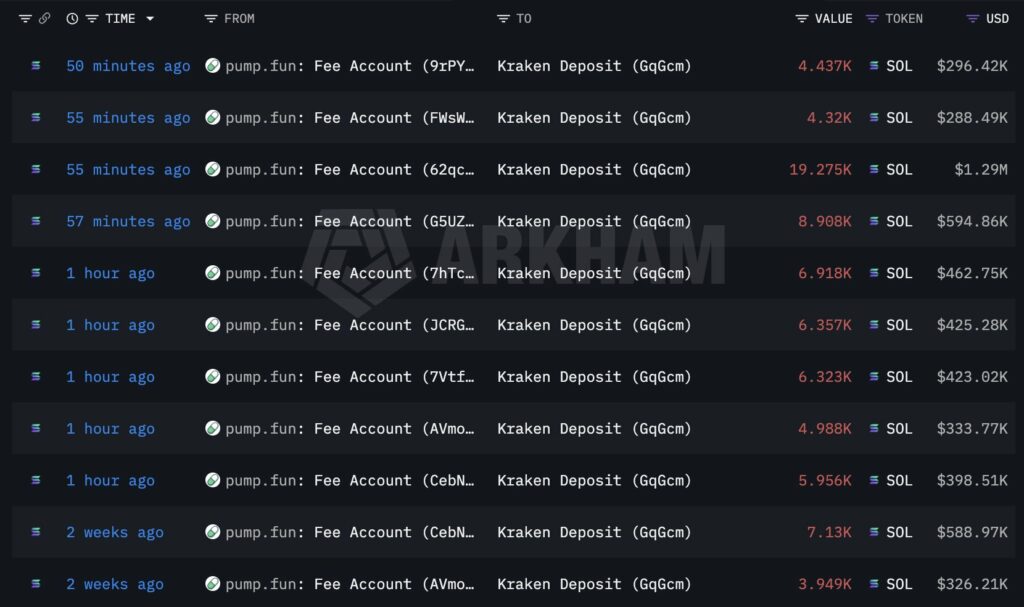
Pump.fun Deposits Another $4.5M in SOL to Kraken as Cumulative Sales Near $785M
Pump.fun is moving SOL again. The meme coin launchpad just deposited 67,482 SOL worth approximately $4.51 million into Kraken over the past hour. Thereby, extending


Related Articles
View More
SpaceX Raptor Engine Explained: How Raptor 3 Became the World's Most Powerful Methane Engine — and What It Means for SPCX Investors
The most powerful methane-fueled rocket engine ever built was not made by a century-old aerospace giant. It came from a private company that nearly went bankrupt in 2008 and now carries a $1.77 trilli
How SpaceX Reusable Rockets Reshape the Space Economy: From Falcon 9 to Starship, and the Road to SPCX's Trillion-Dollar Valuation
Key Takeaways SpaceX reusable rockets fundamentally rewrote the economics of commercial spaceflight: On December 21, 2015, Falcon 9's first-stage booster completed the world's first orbital-class rock

SpaceX Starlink: How the Satellite Internet Works?
This article comprehensively explains how spacex starlink -- SpaceX's low-Earth orbit satellite constellation -- delivers high-speed, low-latency broadband to the world's most remote regions. It contr
MEXC Alpha Trader Research Weekly | Bitcoin Breaks Below $60,000 as SpaceX IPO Countdown and Strong NFP Add Dual Pressure
Week 2 of June 2026Statistical Period: June 3, 2026 – June 9Data Cutoff: June 9, 2026Core NarrativeOver the past week, macro data and institutional capital outflows jointly pressured the crypto market