Different Types of Spot Orders
1. Limit Orders
Example (MX Token):
Imagine you hold 10 MX tokens. With the current market price at 3.4 USDT, you want to sell at 4 USDT.
2. Market Order
A Quick Note on Slippage: Because crypto markets move fast, the final price you get might differ slightly from what you saw on the screen. For instance, if MX is trading at 2.94 USDT, 294 USDT should theoretically buy you 100 MX. However, if the price shifts even slightly between when you click "Buy" and when the order fills, you might end up with a bit more or less than 100 MX.
3. Take-Profit/Stop-Loss (TP/SL)
Limit TP/SL: Requires both a Trigger Price and a Limit Price. Once the market hits the trigger price, the system places a limit order at your predefined limit price.
Market TP/SL: Requires only a Trigger Price. Once the market hits the trigger price, the system immediately executes a market order at the best available price.
Example 1 (Limit Stop-Loss):
You hold BTC and set a Trigger Price of 110,000 USDT and a Limit Sell Price of 100,000 USDT. If the market price drops to 110,000 USDT, the system automatically places a limit sell order, attempting to sell your BTC at 100,000 USDT to cap your losses.
Example 2 (Market Take-Profit):
You hold ETH and set a Trigger Price of 5,000 USDT. When the market price rises to 5,000 USDT, the system instantly submits a market sell order, executing immediately at the best current price to lock in your profits.
4. One-Cancels-the-Other (OCO)
BTC Example:
Imagine BTC is currently trading at $96,500. You want to buy if the price dips to $90,000. However, if the price rises instead, you believe a breakout above $98,000 signals further gains, so you also want to buy at $98,100.
5. Trailing Stop Order
A Trailing Stop order is a dynamic strategy designed to help you enter the market during significant price reversals. Once the market price reaches your specified activation price, the system begins tracking. The order is triggered when the price moves against the trend by your set Trailing Percentage (calculated as Price × (1 ± Trailing %)). Upon triggering, your pre-set order is submitted to the market as either a Limit or Market order.
BTC Buy Example:
Imagine BTC is currently trading at 91,000 USDT. You expect further downside but want to "buy the dip" once a rebound confirms the bottom. You can set an activation price of 90,000 USDT, a Trailing Percentage of 5%, and a Limit Price of 89,000 USDT.
For more in-depth details, please refer to our guides: "What is a MEXC Spot Trailing Stop Order?" and "How to Use Spot Trailing Stop Orders."
6. How to Check Order History
Popular Articles
View More
Cosmos (ATOM) Price Prediction July 2026: One Analyst Called $1 the Worst Case, ATOM Is Almost There
Cosmos (ATOM) just touched its lowest price in months, and traders want to know what happens next. The token sits around $1.58 today, a level that would have looked impossible back when ATOM traded

Advanced U.S. Stock Trading Guide: 8 Powerful Skills for Smarter Market Decisions.
Advanced U.S. Stock Trading Guide: 8 Core Skills for Smarter Market Decisions Most beginner stock trading guides stop at the mechanics: what a stock is, how to place an order, when the U.S. market

How to Read US Stock Sector Rotation: How to Judge Changes in Market Mainlines from Industry Rises and Falls
When one part of the stock market starts winning while another starts losing ground, that is not random noise. It is capital moving with a purpose. Sector rotation is the process of money flowing out

Hot Crypto Updates
View More
Crypto Volatility This Week: How U.S. CPI, PPI, and Fed Policy Are Reshaping Digital Asset Order Books
A dense run of U.S. macroeconomic releases led by June CPI and PPI inflation data and framed by a hawkish, inflation-first Federal Reserve under Chair Kevin Warsh is driving market makers to widen

NVDA vs AMD vs AVGO Where the Contract Trading Opportunities Lie as Chip Stocks Diverge
Overview Three semiconductor stocks the market has long lumped together as AI leaders are charting sharply different paths in 2026: Nvidia's valuation multiple has been heavily compressed, AMD has

ZEC Plunges on Infinite Mint Fears: Analyzing the Market Fallout of the Orchard Bug
Overview Zcash (ZEC) lost roughly half its value in 48 hours in early June 2026, falling from a June 4 peak near $624 to about $309 on June 5 after Shielded Labs disclosed a critical soundness flaw

Trending News
View More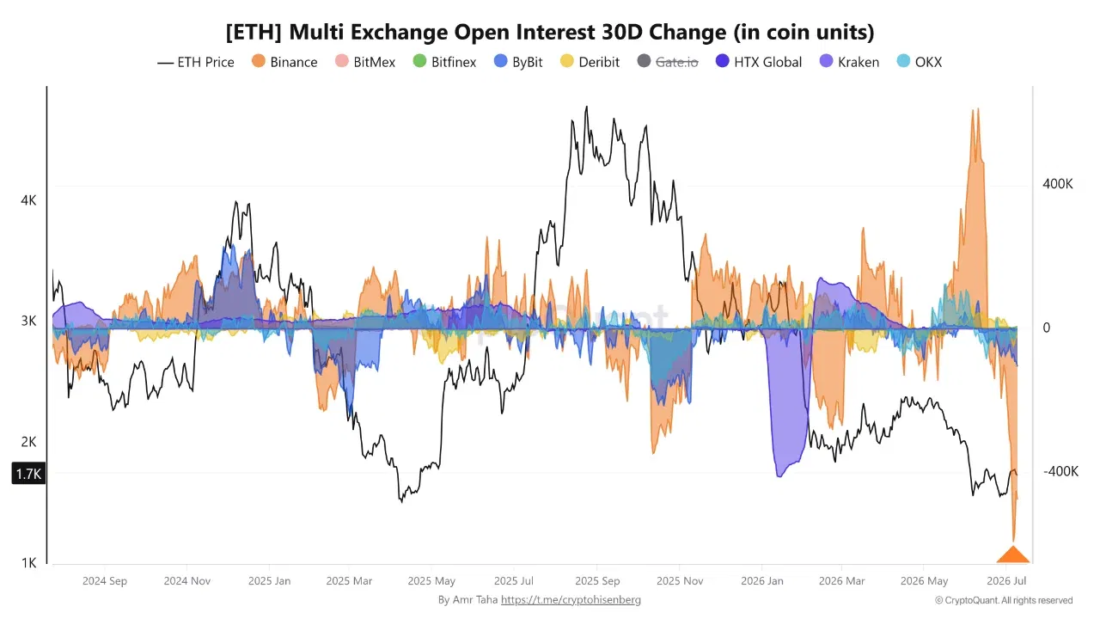
Binance Ethereum Bets Vanish While OKX Traders Pile Back In
Ethereum open interest cooled hard on Binance in July 2026 as OKX spot volume jumped to its strongest level in months. Something in Ethereum’s order books on Binance

Circle faces pressure over 381000 USDC! Are stablecoin issuers now at a crossroads?
🔥 381000 USDC is at the heart of an unresolved crypto fraud case involving Circle. 💼 Prosecutors accuse Circle of not following a court order to return assets converted


Related Articles
View More
MEXC Loans is Now Live!
MEXC Loans is a cryptocurrency lending solution introduced by MEXC. MEXC Loans allows users to collateralize one of their cryptocurrency assets to borrow another that they can then use for spot tradin

What Is RealStocks?
1. What Is RealStocks?RealStocks is an innovative cross-market trading product launched by MEXC in collaboration with regulated brokers for global crypto users. It allows eligible users to directly pu

What Is MEXC Spot Grid Trading?
1. What Is MEXC Spot Grid Trading?MEXC Spot grid trading is an automated trading strategy tool that places buy and sell orders automatically at fixed intervals within a user-defined price range. The c