Ethereum Wallet: What It Is, How It Works, and How to Choose the Best One

- New to Ethereum? Our complete guide to Ethereum covers everything from basics to investment strategies.
- An Ethereum wallet stores your private keys — not ETH itself — and gives you full control over your assets on the blockchain.
- Every Ethereum wallet has a unique wallet address starting with "0x," which is what you share to receive ETH.
- Hot wallets (apps) are convenient for daily use; cold wallets (hardware devices) offer stronger security for long-term holdings.
- Your Secret Recovery Phrase is the only way to restore your wallet — write it down on paper and never store it digitally.
- The best Ethereum wallet for you depends on how much ETH you hold, how often you use it, and how much security you need.
- Once an Ethereum transaction is confirmed on the blockchain, it cannot be reversed — always double-check the address before sending.
What Is an Ethereum Wallet and How Does It Work?
What Is an Ethereum Wallet Address?
- Every wallet has an address — read our piece on what an ETH address is, how it looks, and how to find yours
Types of Ethereum Wallets: Hot Wallets vs. Cold Wallets
1. Software Wallets (Hot Wallets): Easy Access, Everyday Use
2. Hardware Wallets (Cold Wallets): Best for Long-Term Security
3. Paper Wallets: High Security, Low Convenience
How to Create an Ethereum Wallet Step by Step
- Step 1: Choose your wallet type — a mobile app for everyday use, or a hardware wallet for larger, long-term holdings.
- Step 2: Download the wallet from the official website or app store only — never from a third-party link.
- Step 3: Open the app and select "Create New Wallet" to begin the setup process.
- Step 4: Write down your Secret Recovery Phrase (12 or 24 words) on paper and store it somewhere safe offline — this is the only way to recover your wallet if you lose your device.
- Step 5: Never take a screenshot of your recovery phrase or store it on your phone or computer.
- Step 6: Once setup is complete, locate your Ethereum wallet address (starting with 0x) under the "Receive" section — this is the address you give to anyone sending you ETH.
- If funds get stolen, see our guide on how to recover funds lost in ETH transfer scams — step-by-step recovery methods
How to Choose the Best Ethereum Wallet
Ethereum Wallet Security Tips: How to Keep Your ETH Safe
- Never share your private key or recovery phrase with anyone — not even someone claiming to be from a wallet support team.
- Always write your recovery phrase down on paper and store it in a safe physical location, never in a cloud app or note-taking tool.
- Bookmark your web wallet to protect yourself against phishing sites that look identical to the real thing.
- Always double-check the wallet address before sending ETH — transactions on the blockchain are irreversible, with no undo button.
- For a secure Ethereum wallet setup, consider using a hardware wallet for your main holdings and keeping only a small amount in your mobile app for daily use.
Frequently Asked Questions
Conclusion
- For a comprehensive overview of Ethereum's technology, ecosystem, and investment potential, explore our complete Ethereum guide.
- ETH Address: What It Is, How It Looks, How to Find Yours
- ETH Explorer Explained: How the Blockchain Explorer Works
- ETH Scan Guide: Track Wallets, Tokens, and Transactions
- How to Buy Ethereum: Step-by-Step Guide
- How to Swap ETH: Step-by-Step Guide for Beginners
Popular Articles
View More
Is the ETH Bear Market Over? The Rally Is Finally Forcing the Question
Ethereum has started to move like an asset traders can no longer ignore. For months, ETH had a frustrating problem: the story was strong, but the chart did not act like it. Bitcoin had the

The Ethereum Foundation Just Cut Its Budget by 40%: What Does That Mean for ETH's Price? Here's The Ethereum Price Prediction for July 2026
Ethereum opened July 2026 trading near $1,571, a fraction of the roughly $4,950 all-time high it set less than a year earlier. That drop has a lot of people typing the same question into Google in

The US-Iran Peace Deal Just Reset the Ethereum (ETH) Price Prediction, and the Numbers Back It Up
Peace changed the calculus for ETH, and not in the way most investors expected. When the US-Iran ceasefire was confirmed in June 2026, Ethereum did not simply recover alongside the broader market. It

Hot Crypto Updates
View More
Ethereum Price Prediction: Can ETH Reclaim $2,000 as the CLARITY Act Vote Nears? Key Takeaways
Ethereum (ETH) rallied to about $1,944 last week before getting rejected below the $2,000 barrier, and trades near $1,865 at the time of writing, still one of the strongest large caps of the month. A

Robinhood Chain vs Base: Which Ethereum Layer 2 Has the Stronger Financial Ecosystem?
Robinhood Chain and Base are Ethereum Layer 2 networks developed by two of the largest consumer-facing financial platforms in the crypto market. Robinhood Chain is built with Arbitrum technology and

How to Bridge to Robinhood Chain: Move ETH Safely, Fees and Withdrawal Times
Bridging allows users to move ETH and supported tokens between Ethereum, Robinhood Chain and other blockchain networks. Robinhood Chain supports an Arbitrum canonical bridge as well as faster

Trending News
View More
Bitmine Adds Another 20,500 ETH Through Galaxy Digital as Ethereum Treasury Grows
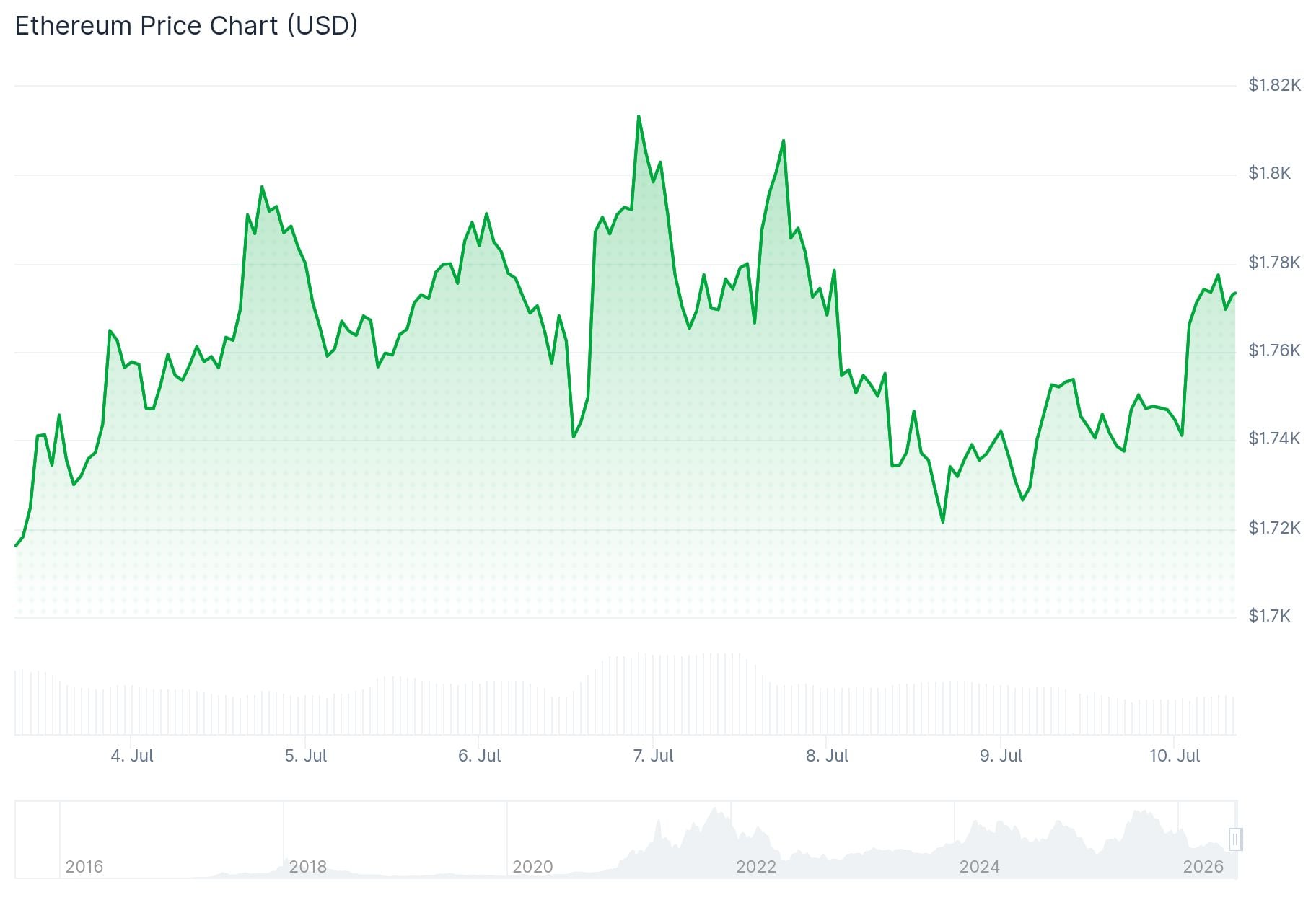
An on-chain transfer of 20,500 ETH, worth approximately $35.92 million, was recorded on July 9 from a Galaxy Digital OTC wallet. Blockchain analysts have linked
Bitmine Buys Another $35.9M Worth of Ethereum
Tom Lee-backed Bitmine bought another 20,500 ETH worth $35.92M through Galaxy Digital, expanding its Ethereum treasury. #Ethereum #ETH #Bitmine #Crypto

Related Articles
View More
Solana Price History: What the SOL Chart Shows and What It Leaves Out
Solana has two all-time highs, and they have almost nothing in common.The first, near $260 in November 2021, was driven by NFT and DeFi activity. The second, around $294 in January 2025, was driven by

What Does BTC Mean in Text? We Read All 56 Slang Entries. "Because They Can" Isn't One.
Search "what does BTC mean in text" and the same answer comes back from site after site: "Because They Can."There is no record of anyone ever saying that.Two of them are the ones you'll actually hit i

Is Polkadot Dead? Polkadot Fixed Its Two Biggest Problems and DOT Fell Anyway
Polkadot is not dead.Its governance still passes major reforms and delivers them on the date it promised, including a supply cap that ended five years of uncapped issuance.But the ecosystem built on t